Last updated: October 21, 2026
Quick Answer: a well-designed AI-assisted SEO workflow can cut repetitive SEO work by 30% or more in practice, but only when the process is narrow, reviewed, and tied to a real business goal. AI-assisted SEO workflow design — The Complete Guide shows how to use AI where it is strong without turning strategy into autocomplete. It suits marketers, founders, and in-house SEO leads who already know the basics of search intent, keyword research, and on-page optimization, but need a repeatable system that saves hours without flooding the site with thin pages. The catch is simple: AI helps most when the workflow is narrow, reviewed, and tied to a real business goal. It fails when used as a content cannon.
Key Takeaways
- The workflow works best when AI and human judgment are split by task.
- Design for review time first, not draft speed.
- AI handles repeatable work; humans handle claims and trade-offs.
- At scale, the SOP should be stricter than the prompt.
The right question here is not “What AI tool is best?” It is “How do I design an SEO workflow that uses AI where it is strong, avoids its weak spots, and still produces pages that rank, convert, and stay on brand?” That is the decision this guide answers, and the rest of AI-assisted SEO workflow design — The Complete Guide builds on that answer.
What Actually Changes the Result in AI-Assisted SEO Workflow Design
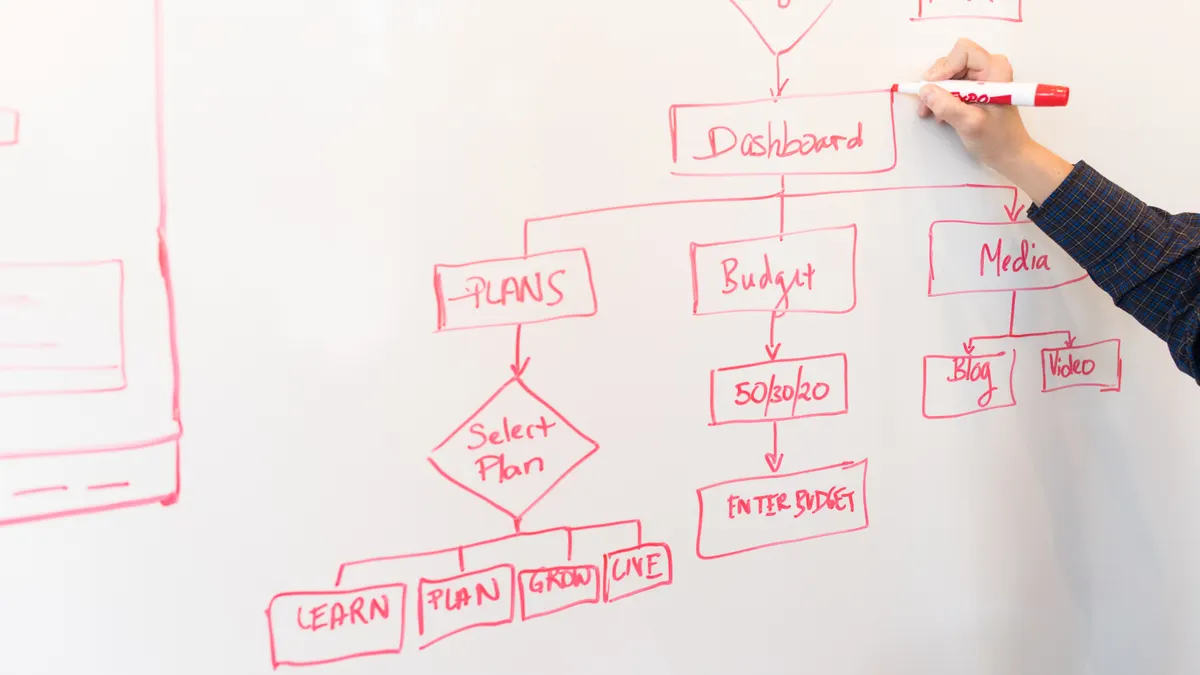
The workflow works only when the task is split into parts that AI can do well and parts that still need judgment. If you feed a model a vague prompt like “write an SEO article,” you get generic text, weak differentiation, and a review burden that is larger than the time saved. If you break the job into research, clustering, outlining, drafting, fact-checking, and optimization, AI becomes a production assistant instead of a content liability.
The biggest variable is not the model. It is the level of control around it. A workflow built for a 5-page service site is not the same as one built for a 5,000-URL ecommerce catalog. A small site can afford close human review on every page. A large site usually needs templates, validation rules, and batch processes. That difference changes the tools, the approval steps, and how much you can automate before quality drops.
| Situation | Best Path | Why Other Options Fail |
|---|---|---|
| New site with under 50 URLs | Use AI for research support, outlines, and first drafts, then edit manually | Full automation usually creates shallow pages that have no topical depth |
| Mature site with 500+ URLs | Use AI for clustering, pruning suggestions, internal link ideas, and metadata drafts | Manual-only workflows waste time and make consistency hard to maintain |
| Regulated topic like finance, health, or legal | Keep AI limited to structure and summarization, then rely on expert review | Unchecked generation can introduce errors that are expensive to fix |
| Ecommerce catalog with thousands of SKUs | Use AI with structured product data and rules-based templates | Freeform prompting creates duplicate descriptions and unreliable specs |
A useful workflow usually starts with a content policy that says what AI may touch and what it must never publish unaudited. That policy is not decoration. It is the difference between speed and mess.
A solid build sequence looks like this:
- Define the one business outcome the workflow must support, such as qualified leads, organic product traffic, or reduced support load.
- Separate tasks into research, ideation, drafting, editing, publishing, and refreshes.
- Mark which tasks are AI-friendly and which need human approval every time.
- Create reusable input templates for prompts, briefs, and review checklists.
- Choose the smallest tool stack that can support the process from keyword discovery to publishing.
- Set quality gates: factual accuracy, intent match, originality, brand voice, and internal link placement.
The trade-off against pure manual SEO is obvious: the AI-assisted version is faster but less forgiving. The trade-off against pure automation is also obvious: the AI-assisted version is slower, but it protects brand quality and search trust. Quick check: if your team cannot explain which step AI owns and which step a person owns, the workflow is not designed yet.
How Do I Build the Workflow Without Creating More Work?
Because review time is usually where the real cost lives, you build it by designing for review time first, not draft speed. If the workflow saves 20 minutes on writing but adds 45 minutes of cleanup, it is a bad workflow. That is why the first task is to map the path from keyword to published page and remove any step that produces duplicate effort.
The most common mistake is using AI at the front end only. People ask for a blog draft, then hand it to an editor who has to reconstruct the brief, verify the angle, check the facts, and rewrite the heading structure. That is not a workflow. That is a cleanup queue.
Start with a simple six-stage model:
- Input stage: keyword, audience, offer, search intent, and angle.
- Research stage: SERP patterns, competitor headers, questions, and topical gaps.
- Brief stage: page purpose, H1, H2s, claims to support, sources to consult.
- Draft stage: first-pass copy, not final copy.
- Review stage: subject matter, brand, SEO, and compliance checks.
- Publish and refresh stage: metadata, links, schema where relevant, and update schedule.
For most teams, tools like ChatGPT, Claude, Gemini, Semrush, Ahrefs, Screaming Frog, Google Search Console, and Google Sheets cover the basics. The tool list matters less than the handoff points. A workflow breaks when the output from one stage does not become a clean input for the next.
A practical build order is this:
- List the page types you actually publish: guides, product pages, location pages, comparison pages, FAQ pages.
- Write one brief template for each page type. A comparison page needs different inputs than a how-to guide.
- Decide what data AI can pull from. For example, a product page workflow should use a spreadsheet with SKU, dimensions, materials, and use case.
- Create a prompt library with fixed prompts for titles, outlines, summaries, meta descriptions, and internal link suggestions.
- Build a review checklist with pass/fail criteria. “Sounds good” is not a criterion.
- Run one page type through the system three times before expanding to another page type.
This is where many teams overcomplicate things. They buy a larger model, add three new platforms, and end up with a workflow no one follows. The better move is usually narrower: fewer tools, more structure, tighter review. Quick check: if the same person has to re-explain the page goal at every stage, the workflow is leaking time.
Which SEO Tasks Should AI Handle, and Which Should Stay Human?
Therefore, AI should handle repeatable, pattern-based work; humans should handle judgment, claims, and trade-offs. That line is not philosophical. It is practical. AI is strong at finding structure, summarizing patterns, rewriting for length, and generating option sets. It is weak at knowing which claims matter, which nuance matters, and what a business can safely promise.
Use AI for these jobs first:
- keyword clustering from a list you already trust
- outline generation from a SERP analysis
- title and meta description variants
- content gap suggestions
- FAQ draft ideas
- internal link suggestions based on a known page map
- summarizing long source material into notes
Keep humans on these jobs:
- choosing the target intent
- deciding the page angle
- verifying facts, dates, specs, and policies
- judging whether the page is too similar to existing content
- checking brand voice and legal risk
- deciding what not to say
If the page is informational and low risk, AI can draft more of the body. If the page is commercial and tied to revenue, a human should shape the offer language. If the topic touches health, finance, or law, AI should stay in a supporting role and the final copy should be reviewed by a qualified professional.
A useful rule is the “claim ladder.” The lower the claim, the easier it is to automate. A statement like “This page explains how to compare project management software” is low risk. A statement like “This software will save your team 30%” is high risk unless there is solid evidence. Avoid letting the model invent proof. It will do so confidently.
The trade-off against full automation is slower output, but the gain is trust and fewer corrections. The trade-off against human-only writing is lower throughput and less consistency. Quick check: if a sentence would be embarrassing to defend in a client meeting, that sentence should never be AI-published without a person checking it.
If You’re Building Content at Scale, What Should the SOP Look Like?
If you are publishing at scale, the SOP should be stricter than the prompt. AI at scale without a standard operating procedure produces inconsistent formats, duplicate angles, and a review backlog. The SOP must define inputs, review criteria, escalation rules, and the exact point where a draft is not allowed to move forward.
At scale, the main risk is not that AI writes badly. It is that it writes differently every time. One page may overuse headings, another may be too short, and a third may drift off intent. An SOP prevents that drift by turning quality into a checklist.
A workable SOP usually includes:
- approved page types and forbidden page types
- source rules: what data can be used, what sources are preferred, what sources are banned
- prompt templates with fixed fields
- content length ranges by page type
- heading structure standards
- internal link rules
- review assignment rules
- publication checklist
- refresh trigger rules, such as search decline or product change
One practical pattern is a three-pass review. Pass one checks intent and structure. Pass two checks claims and source support. Pass three checks SEO elements like title, headers, links, and metadata. That sounds slow, but it is usually faster than having one reviewer do everything from scratch.
For a large site, batch work matters. A spreadsheet with 100 URLs can be turned into a content plan, but only if the columns are clean. At minimum, track page URL, current title, target keyword, search intent, content type, priority, owner, status, and next refresh date. Without those fields, AI suggestions are just noise.
Here is a clean production path:
- Export the page list from the CMS or crawl it with Screaming Frog.
- Tag each URL by page type, intent, and business value.
- Assign a refresh action: rewrite, expand, consolidate, or leave alone.
- Generate a draft brief from the structured data, not from memory.
- Use AI to suggest missing sections and internal links, then verify each suggestion against the actual site map.
- Route only approved drafts into the CMS.
This process is not for a small site with five pages and one writer. It is for teams where consistency matters more than creative freedom. Quick check: if you need someone else to read a page and know exactly what quality standard it had to meet, you need an SOP, not just prompts.
What Does a Good AI SEO Stack Actually Include?
A good AI SEO stack includes one strong model, one source of truth, one SEO crawler, and one place to manage editorial work. That is enough for most teams. More tools are not automatically better. They often just create duplicate dashboards and conflicting suggestions.
A useful stack usually looks like this:
- Model layer: ChatGPT, Claude, or Gemini for drafting, summarizing, and rewriting.
- SEO data layer: Google Search Console for performance, Ahrefs or Semrush for keyword and competitor data, Screaming Frog for crawl data.
- Workflow layer: Notion, Asana, Airtable, or Trello for briefs and task tracking.
- Content layer: Google Docs, WordPress, Webflow, or another CMS with an editorial review process.
- Validation layer: human fact-checking, style review, and, where relevant, legal or subject-matter review.
The right stack depends on volume. A freelancer or small team can often run the process in Google Docs and Sheets with a model subscription and Search Console. A mid-sized team may need Airtable or Asana to prevent task loss. A larger organization usually needs stronger permissions, version control, and clearer status tracking.
The trade-off against buying an all-in-one platform is lock-in. All-in-one tools can be convenient, but they often hide how the workflow works. When the system is opaque, it is harder to fix. The trade-off against a DIY stack is setup time. DIY gives more control, but only if someone is willing to maintain it.
Two standards matter here. First, use Google Search Console as the baseline for organic performance, because it shows actual query and page data from the site itself. Second, use a crawl tool like Screaming Frog to see structure, indexability, titles, and status codes. Those are not AI features, but they are what make AI suggestions useful instead of random.
If you need source material for best practices, Google Search Central’s documentation on SEO basics and content quality is a sensible reference point, and the Google Search Console Help pages are useful for understanding what the performance data actually means. The point is not to worship one tool. It is to ground the workflow in data that is real, not guessed.
Quick check: if you cannot point to where the workflow gets its crawl data, its query data, and its editorial status, the stack is incomplete.
Edge Cases Where the Normal Advice Breaks Down
However, AI-assisted SEO workflow design gets messy in a few predictable situations. Those are the cases where a generic “use AI for outlines and humans for editing” answer falls apart.
1) Regulated content
If the topic is finance, health, legal, insurance, or safety, the normal workflow changes because error cost is high. What changes is the review threshold. What to do instead: keep AI on structure, summaries, and variant generation, then require expert review before publication. A page about retirement accounts or medication side effects should not go live on model output alone, and a qualified professional should review it before publication.
2) Heavy product catalog pages
If the site has hundreds or thousands of near-duplicate product pages, the normal advice changes because uniqueness has to come from structured data, not creative prose. What changes is the input. What to do instead: feed AI attribute data, use templated sections, and keep variation tied to factual differences like size, material, compatibility, and use case.
3) Brand-sensitive thought leadership
If the goal is executive positioning or opinion-led content, the normal advice changes because voice matters more than volume. What changes is the source of truth. What to do instead: use AI to draft from a real outline, interview notes, or approved talking points, then have a senior editor shape the final argument. Generic AI opinion writing is easy to spot.
4) Local SEO with many locations
If the workflow covers 20, 200, or 2,000 location pages, the normal advice changes because duplication can become a ranking and quality problem. What changes is the templating discipline. What to do instead: vary only the parts that are truly local, such as staff, service areas, parking, hours, and local proof points.
5) Thin search demand
If the keyword has low demand or the topic is too narrow, the normal advice changes because a full AI workflow may cost more than the page is worth. What changes is the business case. What to do instead: treat the page as support content, not a primary traffic bet, and consult a professional if the page carries compliance or reputational risk. Sometimes the better move is to combine it with a broader guide.
6) Sites with messy legacy content
If old pages are inconsistent, duplicated, or poorly tagged, the normal advice changes because AI will mirror the mess. What changes is the source library. What to do instead: clean the content inventory first, then automate. If the input is chaotic, the output will be too.
Quick check: if your site has compliance risk, templated pages, or a chaotic archive, you need constraints before you need more AI.
What Should You Measure So the Workflow Does Not Fool You?
You should measure output quality, not just output volume. A workflow can look productive and still miss the actual job. If the team publishes 30 pages and none of them gain impressions, clicks, rankings, or qualified leads, then the workflow is busy, not useful.
The cleanest measures are:
- time from brief to publish
- percent of drafts that pass review without major rewrite
- pages indexed and appearing for target queries
- search impressions and clicks in Google Search Console
- assisted conversions or lead quality where tracking exists
- refresh turnaround for stale pages
Do not stop at word count or publish count. Those are activity measures, not outcome measures. A 2,500-word page can still be wrong. A 600-word page can still be right if it matches intent and answers the query better than competing pages.
A practical measurement routine uses a 30-day and 90-day view. In the first month, look for workflow friction: where drafts stall, where reviews pile up, and where prompts keep failing. In the 90-day window, look for content performance by page type. Some formats, such as comparison pages or bottom-funnel pages, may show value faster than broad informational guides.
If you are deciding whether AI is worth it at all, ask one blunt question: did the workflow improve quality without making review harder? If the answer is no, the system is too loose. If the answer is yes but the content is still underperforming, the issue may be intent selection rather than AI.
One useful benchmark is editorial consistency, not a fixed percentage. If every page type has the same structure, clear intent, and a repeatable review path, the system is healthy. If every page needs a different rescue plan, the system is not designed yet.
Quick check: if you are only measuring how many pieces were published, you are missing the point of the workflow.
The Simplest Workflow That Still Works
Overall, the simplest workflow that still works is a four-part system: structured input, AI-assisted drafting, human review, and performance feedback. It is simple because anything more complicated usually breaks under real deadlines. It still works because each stage has a clear owner and a clear job.
Here is the version I would use for a small or mid-sized team that wants speed without chaos:
- Pick one page type first, such as a how-to article or a product comparison page.
- Build a brief template with fields for intent, audience, target query, supporting sources, and internal links.
- Use AI to produce an outline and first draft from the brief, not from a blank prompt.
- Have a human check claims, structure, duplication, and brand fit.
- Publish, then review Search Console data after 30 to 60 days.
- Update the template based on what worked and what caused rework.
That workflow is not flashy, and that is the point. It is designed to reduce waste, not to impress anyone with automation theater. If the site is large, layer on permissions, status tracking, and batch processes. If the site is small, keep it light and disciplined.
The honest downside is that AI-assisted SEO workflow design still needs human ownership. There is no version of this process that runs itself well for long. The upside is that a good system gives you speed, consistency, and a cleaner path from keyword to published page. That is the part worth keeping.
Quick check: if you want a system that can be explained in one minute and run by a small team, this is the right shape.
Drafted with AI; not yet reviewed by a person.